A helping hand for requesting Edge Services within DestinE

With powerful cloud computing infrastructure, rich data collections and accurate digital replicas of our planet, Destination Earth (DestinE) gives users a wealth of resources for answering Earth-system queries. Comprehensive documentation is now available to take you step-by-step through the process of getting access to Edge ServicesComputing and storage capabilities provided within the Desti More – essential gateways for leveraging these resources.
DestinE provides a broad range of services and data libraries. Through the DestinE PlatformSelf-standing DestinE system component, interfacing with the More, any registered user can access a number of services, but organisations wishing to carry out larger projects using the distributed capabilities of the Destination Earth Data Lake need to request access to Edge ServicesComputing and storage capabilities provided within the Desti More.
Edge ServicesComputing and storage capabilities provided within the Desti More enable entities such as EU public authorities, universities, research institutes or small and medium-sized enterprises (SMEs) to develop applications and further services, along with drawing on a comprehensive pool of products in the DestinE Data Portfolio. These users can undertake projects through Data Lake cloud computation and storage tools that reside close to Big Data stores and High-Performance Computing centres. The four Edge ServicesComputing and storage capabilities provided within the Desti More are:
- STACKA DestinE Data Lake Edge Service providing hosted applicatio: provides Software-as-a-Service (SaaS) solutions based on the Jupyter ecosystem and parallel computing tools. These facilitate processing in the vicinity of data from the DestinE Data PortfolioThe DestinE Data Portfolio is tailored to user needs and com More
- HOOKA DestinE Data Lake Edge service providing high-level pre-de: a collection of pre-defined functions (Function as a ServiceRegular provision of technological capabilities, resources, More; FaaS) for data retrieval and processing
- ISLET ComputeA cloud computing Edge Service based on OpenStack that pro: a cloud computing service that supplies Infrastructure-as-a-Service (IaaS) and Platform-as-a-Service (PaaS) solutions, enabling users to manage and deploy computational workloads on a scalable, flexible and distributed architecture
- ISLET StorageA Data Lake Edge Service offering a repository for users’: a repository for users’ data and processing results
Access to Edge ServicesComputing and storage capabilities provided within the Desti More is subject to a formal submission and review procedure.
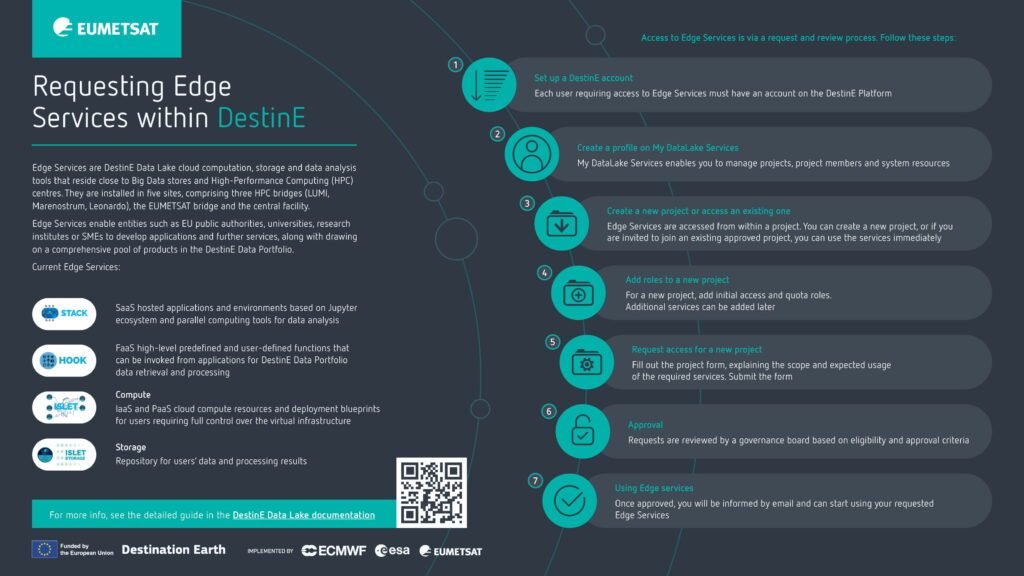
What are the steps to follow to benefit from Edge ServicesComputing and storage capabilities provided within the Desti More
- Set up a DestinE account
Each user requiring access to Edge ServicesComputing and storage capabilities provided within the Desti More must have an account on the DestinE PlatformSelf-standing DestinE system component, interfacing with the More.
- Create a profile on My DataLake Services
You then need to create a profile on My DataLake Services, where you can manage projects, project members and system resources.
- Create a new project or access an existing one
Edge ServicesComputing and storage capabilities provided within the Desti More are accessed within the context of a project, defined in My DataLake Services as a grouping of users and roles. Each user can either create a new project or join an existing one.
To create a new project, describe the activities involved by filling in the project form in My DataLake Services.
To join an existing project with Edge ServicesComputing and storage capabilities provided within the Desti More already enabled, ask the project owner or administrator to send you an invitation code.
- Add roles to a new project
The next step for a new project entails adding access and quota roles. Access roles define which Edge ServicesComputing and storage capabilities provided within the Desti More are needed, while quota roles are the required resources, such as CPUs, RAM and storage. Additional services can be added later, subject to approval.
- Request access
Once the roles in a new project have been selected, submit the project form, which must include a clear justification for the required services and resources. Typically, this will involve explaining the work of the project and the expected volume of data processing.
- Operator Approval
All requests are reviewed by a governance board based on eligibility and approval criteria.
- Using Edge services
Once approved, you will be informed by email and can start using your requested Edge ServicesComputing and storage capabilities provided within the Desti More.
A detailed step-by-step guide to requesting Edge ServicesComputing and storage capabilities provided within the Desti More is given in the DestinE Data Lake online Documentation.